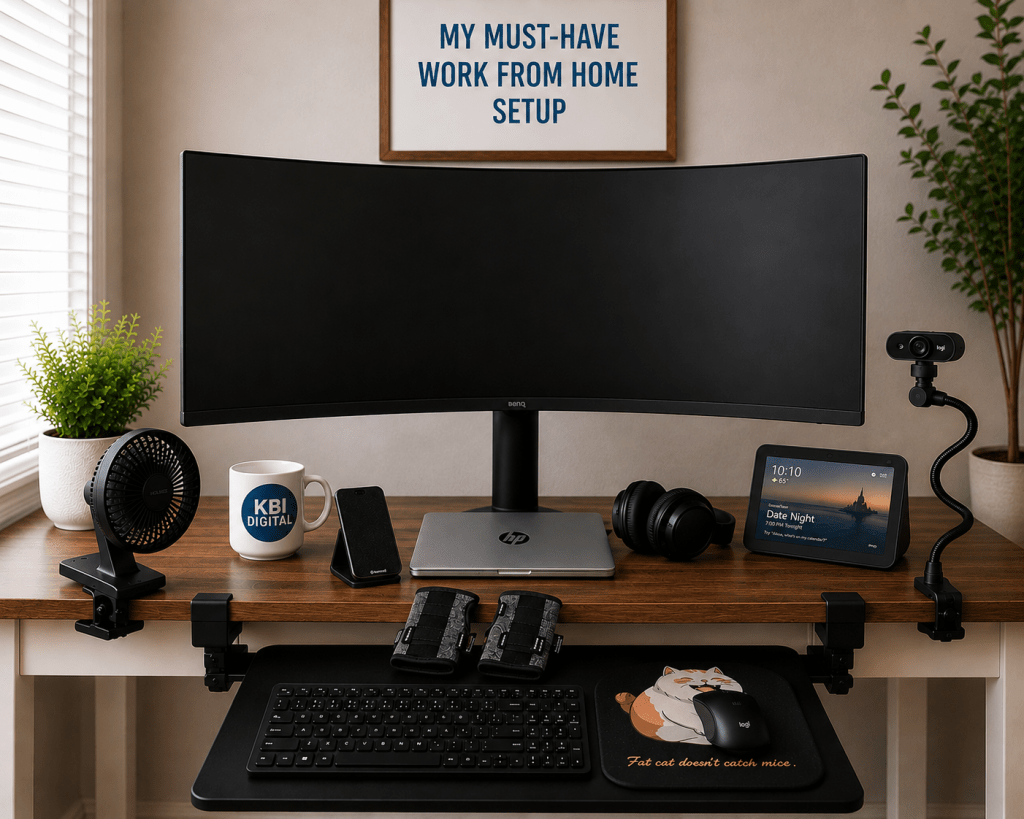
Working from home sounds simple—grab a laptop, find a desk, and get to work. But when you spend hours at your desk every day, your setup can make a huge difference in your comfort, productivity, and ability to stay focused.
Over time, I’ve figured out which items I actually use and appreciate every day. Some help me stay comfortable, some save valuable desk space, and others simply make meetings and multitasking easier.
Here are my work-from-home must-haves.
Affiliate Disclosure: As an Amazon Associate, I earn from qualifying purchases. This means I may receive a small commission if you purchase through links on this page, at no additional cost to you.
1. Large Curved Monitor
The centerpiece of my workspace is a large curved monitor, and once you get used to all that screen space, it’s difficult to go back.
A large monitor gives me room to have multiple applications open at the same time. I can work in one window while referencing information in another without constantly minimizing and reopening screens.
For anyone working with spreadsheets, dashboards, reports, documents, email, or multiple browser windows, the extra screen space is a major productivity boost.
Why I love it: More screen space, less window switching, and a much better workspace for multitasking.
I have two of these monitors and two desks in my office, one is dedicated for work and the other for personal and everything else, like writing this blog. I really like the Samsung 49 inch curved monitors. Here is a link for a search on Amazon: https://amzn.to/4gDnG9S
2. Webcam with a Flexible Clamp Stand
Video meetings are part of working from home, but I don’t want a webcam taking up valuable desk space.
A webcam on a flexible stand with a desk clamp solves that problem. The clamp keeps it securely attached to the desk while the flexible arm lets me move the camera higher, lower, closer, or farther away.
It also makes it much easier to find a good, professional camera angle without rearranging the entire desk.
Why I love it: It saves space and lets me position my camera exactly where I want it. Links to the camera and clamp on stand that I use every day is listed below. Amazon is sold out of my exact camera and stand but I put in a search that you can find some stands that are similar.
Camera: https://amzn.to/4xtlZTI
Stand: https://amzn.to/3UH0Iap
3. Clip-On Desk Fan
This may seem like a small thing, but my clip-on fan is one of those inexpensive items I use constantly.
Instead of putting a regular fan on the desktop, I use one with a strong clip that attaches directly to the edge of the desk. I get the airflow I want without sacrificing workspace.
It’s especially useful when you’re sitting in the same spot for several hours.
Why I love it: It keeps me comfortable while taking up almost zero desk space.
4. Ergonomic Mouse Pad
If you work on a computer all day, don’t overlook your mouse setup.
An ergonomic mouse pad with wrist support helps keep my wrist in a more comfortable position while I’m working. It’s a small upgrade, but when you’re using a mouse for hours every day, small ergonomic improvements can make a noticeable difference in comfort.
And mine has a fat cat on it—which makes it considerably more entertaining than a plain black mouse pad!
Why I love it: Extra wrist support, more comfort, and a little personality in my workspace.
Mouse Pad: The cat mouse pad is sold out, the other one that I use is just the amazon basics brand: https://amzn.to/4y4h1N1
5. Wrist Support Gloves
I also keep wrist support gloves nearby for times when I want a little extra support while working.
They’re easy to put on when needed and don’t require changing anything about my workstation. For someone who spends a lot of time typing and using a mouse, I like having different comfort options available.
Why I love them: They’re simple, convenient, and easy to keep right at my desk. I use these all the time. I am on the keyboard almost every day all the time and my carpal tunnel would be way worse without them.
Gloves: https://amzn.to/3SsncLJ
6. Jabra Headphones
A dependable headset is essential when your workday includes virtual meetings and calls.
My Jabra headphones give me a dedicated option for meetings without relying on the computer’s built-in speakers and microphone. They’re also helpful when I need to concentrate and block out some of the distractions around me.
For remote workers who spend a lot of time in Teams, Zoom, or other virtual meeting platforms, good headphones are one of the pieces of equipment worth prioritizing.
Why I love them: Clearer meetings, better sound, and fewer distractions. I have dogs and they bark at everything, I mean everything. When I am on a teams meeting no one hears this with these headphones. Jabra is a little pricey but so worth it.
Headphones: https://amzn.to/4gkfGvv
7. Echo Show
My Echo Show has earned a permanent spot on my desk.
I like having a separate smart display available without needing to open another window on my computer. It can handle quick information, timers, reminders, weather, music, and other little tasks throughout the day.
Those may sound minor, but the whole point of a good workspace is reducing unnecessary interruptions.
Why I love it: It’s a convenient little assistant that doesn’t take over my main work screen.
Echo Show: https://amzn.to/4gw9rn8
8. Angled Phone Stand
Another very simple addition is an angled phone stand.
Instead of leaving my phone flat on the desk—or constantly picking it up—I can keep it upright where notifications are easy to see. It’s also convenient for charging, video calls, checking messages, or using the phone as another small reference screen.
Most importantly, it gives the phone a designated home instead of letting it migrate around my desk all day.
Why I love it: My phone stays visible, organized, and within reach without cluttering my workspace.
Phone Stand: https://amzn.to/4zGwODa
It’s About Working Smarter, Not Harder
A good work-from-home setup doesn’t have to be complicated or filled with expensive equipment.
For me, the best additions are the ones that solve an everyday problem: more screen space, better comfort, fewer things sitting on the desk, easier meetings, and a more organized workspace.
My current must-haves are:
- Large curved monitor
- Webcam with flexible clamp stand
- Clip-on desk fan
- Ergonomic mouse pad
- Wrist support gloves
- Jabra headphones
- Echo Show
- Angled phone stand
The goal isn’t to create a picture-perfect office. It’s to create a workspace that makes it easier and more comfortable to get things done.
Work Smarter, Not Harder!
— KBI Digital


Leave a Reply