It’s a long holiday weekend, and I’m heading to a cabin for a little getaway. There’s just one catch:
I still have to work a little.
One of the things I love about working remotely is that sometimes “working from home” doesn’t actually have to mean working from home. This weekend, my office is going to have a much better view!
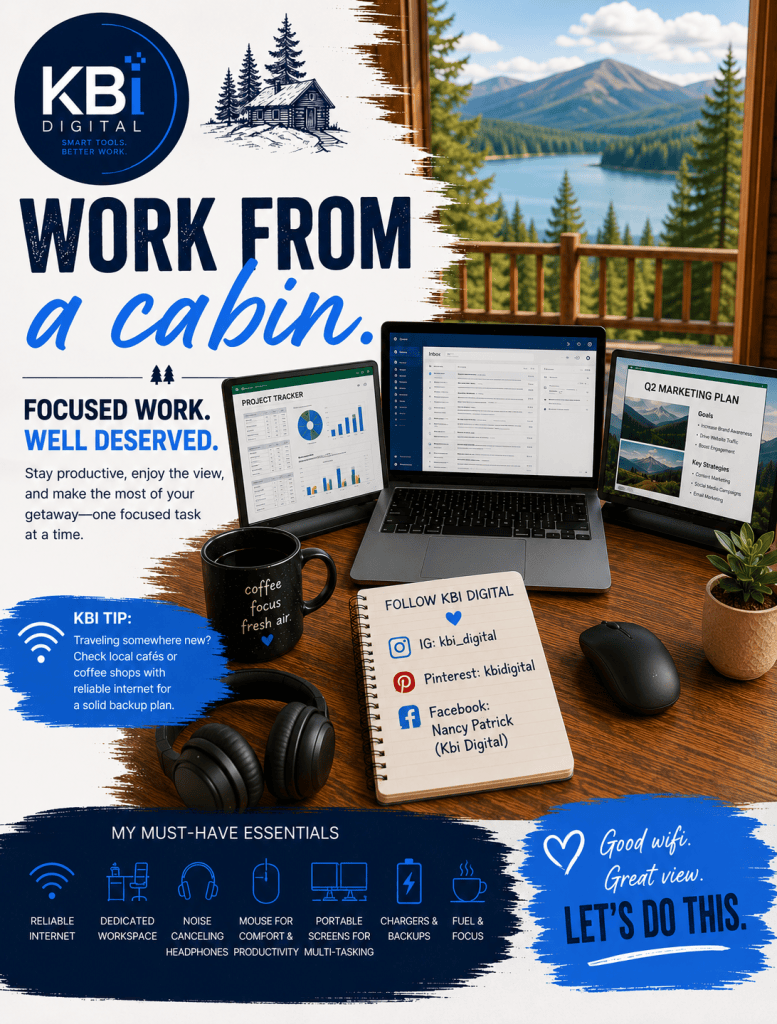
I’ve stayed at this particular cabin before, so I already know the internet connection is decent. That makes packing up my laptop and working remotely a lot less stressful. But if I were traveling somewhere new, internet access would be one of the first things I’d check.
Know Your Internet Options Before You Go
If you have meetings, deadlines, or other work that absolutely has to get done, don’t just assume your destination’s Wi-Fi will be good enough.
Before leaving, check whether your hotel, cabin, rental, or resort has reliable internet. If you’re traveling somewhere unfamiliar, I also recommend looking for nearby:
- Coffee shops
- Cafés
- Libraries
- Hotel business centers
- Coworking spaces
Even if you never need them, knowing where you can find reliable Wi-Fi gives you a backup plan.
If your cell phone plan allows it, your phone’s hotspot can also be a lifesaver. Just make sure you know your hotspot limits before depending on it for a full workday or video meetings.
KBI Digital Tip:
Don’t wait until five minutes before an important meeting to discover that the cabin Wi-Fi can’t handle a video call. Have a backup plan before you travel.
Create a Dedicated Work Area
I know it’s tempting to sit on the couch or work from bed when you’re at a cabin or vacation rental, but I find I’m much more productive when I create a designated workspace.
It doesn’t have to be fancy.
A dining room table, kitchen island, small desk, or even a table on a covered porch can become your temporary office.
When I arrive, I like to find a spot with:
- A comfortable chair
- Good lighting
- Easy access to an outlet
- A strong Wi-Fi signal
- Enough room for my laptop and mouse
- As few distractions as possible
Having a specific place to work also makes it easier to separate work time from vacation time.
When I’m finished, I can close the laptop and walk away.
My Noise-Canceling Headphones Always Come With Me
One thing I almost always bring when I’m working away from home is my noise-canceling headphones.
At home, I have more control over my environment. When I’m traveling, I don’t know what might be happening around me.
Other people talking. A TV playing. Dogs barking. Music in a coffee shop. Someone cooking in the kitchen.
My headphones help create my own little work bubble no matter where I happen to be.
They’re especially important if I have meetings or need a block of focused work time.
Here is a link to my favorite brand Jabra: https://amzn.to/4gkfGvv
I Need a Mouse!
Some people can happily work all day using a laptop trackpad.
I’m not one of those people.
A mouse is one of those small things that can make a temporary workspace feel much more like my regular office. It takes almost no room in my bag, and for me, it makes working much faster and more comfortable.
If you’re putting together a remote-work travel bag, a mouse would definitely be on my must-have list.
When One Laptop Screen Isn’t Enough
At home, I’m spoiled by my big monitor. I love having plenty of screen space because I’m constantly multitasking.
I might have email open on one side, a document on another, and a browser or application somewhere else.
For a weekend trip like this one, I can live with just my laptop screen because I’m only planning to work a limited amount.
But if I’m going to be away longer or have several full workdays during a trip, that’s different.
That’s when portable laptop monitors are worth bringing.
Portable screens can give you a dual- or even multi-monitor setup without trying to travel with your home-office monitor. They’re especially helpful if your job involves spreadsheets, analytics, presentations, research, multiple applications, or anything else where you’re constantly switching between windows.
They can also make it easier to arrange your work comfortably rather than staring at one small screen all day.
Link for portable laptop monitors: https://amzn.to/4gFRItm
Don’t Forget the Boring Stuff
The little things are usually what get forgotten.
Before I leave, I make sure I have my:
Laptop + charger Mouse Noise-canceling headphones Phone charger Any necessary USB or charging cables Portable monitors if I’ll be working longer days Portable monitor cables/adapters Power bank Extension cord or compact power strip
That last one can be surprisingly useful.
Vacation rentals aren’t designed around your laptop setup, and the perfect table may not have an outlet anywhere near it.
Download What You Need Before You Leave
Even when I’m expecting good internet, I don’t want my entire workday dependent on it.
If I know I’ll need certain documents, presentations, spreadsheets, or other files, downloading important items ahead of time can provide another layer of protection.
It’s especially useful if you’re traveling somewhere more remote where internet service might occasionally drop.
Just make sure you’re following your company’s security policies when storing or accessing work files away from your normal workspace.
Test Your Setup When You Arrive
Don’t unpack your laptop two minutes before your first Monday morning meeting.
Once you arrive, connect to the Wi-Fi, open your laptop, and make sure everything works.
Check your internet connection, VPN if you use one, headphones, camera, microphone, chargers, and portable monitors.
Five minutes of testing can prevent a very stressful morning.
Set Your Work Hours — Then Enjoy the Trip
This may be the most important part.
I’m going away for a long holiday weekend because I want to enjoy the long holiday weekend.
Yes, I need to get a little work done, but I don’t want work creeping into every hour of the trip.
If possible, decide ahead of time when you’re going to work.
Maybe that’s a couple of hours early in the morning before everyone gets moving. Maybe you need one afternoon block for meetings. Maybe you knock out your most important tasks first and then close the laptop.
Having defined work hours can help you stay productive without feeling like you spent your entire getaway working.
KBI Digital Tip:
Remote work gives you flexibility, but flexibility works best when you give it some boundaries. Get your work done, close the laptop, and go enjoy where you are.
My Temporary Cabin Office
This weekend, I won’t have my big monitor or my complete home-office setup.
And that’s okay.
I’ll have my laptop, mouse, noise-canceling headphones, a decent internet connection, and a dedicated place to sit down and get things done.
That’s really all I need for a short trip.
For longer trips, I’d add my portable screens and turn that temporary workspace into a much more complete mobile office.
The goal isn’t to recreate your entire home office everywhere you travel.
It’s to bring the few things that help you stay comfortable, focused, and productive — so you can finish your work and get back to enjoying your trip.
Work smarter, not harder — even when your office happens to be a cabin.
— KBI Digital
As an Amazon Associate, I earn from qualifying purchases.


Leave a Reply