Working from home sounds simple until you actually do it.
There’s no commute. No one is stopping by your desk. You have your own kitchen, your own coffee, and all the comforts of home around you.
So why can it sometimes feel like there still aren’t enough hours in the day?
After working from home, I’ve learned that being productive isn’t about sitting at my desk for eight straight hours. It’s about giving my day enough structure to keep me moving while still taking advantage of the flexibility that comes with working remotely.
I’m a big believer in routine—but not a schedule so rigid that one unexpected meeting throws off the entire day.
My routine also isn’t limited to the hours I’m sitting at my desk. How I start my morning, when I take breaks, how I plan project work, what I do during on-call weeks, and even when I put my phone away at night all affect how productive I am.
Here’s how I structure my work-from-home day to actually get things done.
My Day Starts at 6:00 AM—But Work Doesn’t
I get up every morning at 6:00 AM, but I don’t immediately head to my laptop.
That time before work is important to me.
I give myself time to wake up, eat breakfast, connect with the dogs, get ready, and simply have a little personal time before the workday begins.
One of the things I appreciate about working from home is that I don’t have to spend that time commuting. Instead of sitting in traffic, I can have breakfast, spend time with my dogs, get myself ready, and ease into the morning.
By the time I sit down at my desk, I already feel like I’ve had a morning rather than feeling like I woke up and immediately went to work.
I’m usually logged in and working by 7:30–8:00 AM.
That’s earlier than many people I work with, but I’ve discovered that those early hours can be some of the most productive time in my entire day.
KBI Tip: Don’t make your laptop the first thing you see every morning. Even if you only have a short amount of time, create a little separation between waking up and starting work.
I Take Advantage of the Quiet Before the Meetings Start
There is another reason I like starting early.
It’s quiet.
Getting online around 7:30 or 8:00 gives me a window before many of the meetings, messages, questions, and other interruptions begin.
I can check my calendar, go through emails, respond to anything that needs immediate attention, look at my priorities, and get things started.
Sometimes I can make more progress during that quiet period than I can during a much longer block later in the day.
Once meetings begin, the day can move very quickly. You can suddenly look at the clock and realize it’s noon and you’ve spent the entire morning talking about work without having much time to actually do the work.
Starting early gives me a head start.
KBI Tip: If your schedule allows it, experiment with starting a little earlier than the rest of your team. Even 30–60 minutes of relatively interruption-free time can make a big difference.
I Decide What Actually Needs My Attention
Emails can take over your entire day if you let them.
I use my early morning time to see what’s come in and handle anything truly urgent, but I don’t want my inbox deciding everything I accomplish that day.
I also look at my calendar, upcoming meetings, deadlines, and the projects I need to move forward.
Then I ask myself a simple question:
What absolutely needs to get done today?
There will almost always be more work than available time.
Some tasks are urgent. Some are important. Some can wait until tomorrow. And some probably don’t need as much attention as we initially think they do.
Knowing the difference helps me decide where my time should go.
My Calendar Isn’t Just for Meetings
One of the biggest changes I’ve made in how I manage my workday is using my calendar for more than meetings.
I use it to protect time for actual work.
If I have a project that requires concentration, I block time for it.
Otherwise, that time has a funny way of disappearing.
Someone schedules a meeting.
An email comes in.
A message pops up.
Someone needs something.
And suddenly the hour you thought you had available is gone.
A typical day might include time for email and planning, team meetings, focused project work, lunch, follow-ups, administrative tasks, another focused work period, and an end-of-day reset.
I don’t follow the schedule down to the minute. That’s not realistic.
The point is to give my day direction.
KBI Tip: If something is important enough that it needs an hour of uninterrupted attention, put that hour on your calendar.
I Schedule Project Work Around My Meetings
One thing I’ve learned is that project work doesn’t magically happen in the spaces between meetings.
You have to make time for it.
At the beginning of the day, I look at my meeting schedule and figure out where I have blocks of time available for project work.
If I know I have a large project that needs my attention, I intentionally put that work on my calendar.
I also think about the type of work I’m trying to accomplish.
A 30-minute opening might be enough to answer emails, review something, make a few updates, or complete a smaller task.
But if I’m analyzing information, building something, solving a problem, writing, planning, or working through a complicated project, I want a larger block of uninterrupted time.
Whenever possible, I schedule that work around my meetings rather than hoping I’ll find time for it later.
Blocking the time has another benefit: it helps protect that space from becoming another meeting.
If I see an open two-hour window and know I need it for a project, I’ll put the project on my calendar.
Now that time has a purpose.
Does that mean nothing ever interrupts it?
Of course not.
Sometimes something urgent comes up and the schedule has to change. That’s part of working with a team.
But there’s a big difference between occasionally moving a project block because something important happened and never scheduling project time in the first place.
KBI Tip: Don’t keep your project work only on your to-do list. Put it on your calendar. A task tells you what you need to do. A calendar block tells you when you’re going to do it.
I Group Similar Tasks Together When I Can
Constantly switching between different kinds of work can be exhausting.
Answer an email.
Work on a report.
Respond to a message.
Jump into a meeting.
Go back to the report.
Answer another email.
Before you know it, you’ve been busy for three hours but don’t feel like you’ve accomplished anything.
Whenever possible, I try to group similar work together.
I might handle several emails at once, work through administrative tasks together, or set aside a block specifically for project work.
Of course, you can’t control every interruption. But reducing unnecessary switching helps me stay focused longer and makes it easier to see actual progress.
I Protect Focus Time
Some work simply cannot be done well while you’re answering messages every two minutes.
When I need to concentrate, I try to remove as many distractions as possible.
That can mean closing email, silencing notifications, putting my phone aside, or simply making it clear that I’m concentrating on something and will respond afterward.
And working from home doesn’t automatically mean fewer distractions.
The distractions are just different.
Laundry can wait.
The dishwasher can wait.
That random thing you suddenly notice needs organizing can definitely wait.
There’s always something you could be doing around the house. During working hours, I try to treat my work time like work time.
I Actually Take Breaks
Taking a break can feel counterproductive when your to-do list is long.
It isn’t.
Sitting in the same position and staring at the same screens for hours doesn’t necessarily mean you’re accomplishing more.
I get up.
I stretch.
I walk around.
I refill my drink.
I check on the dogs.
Sometimes I just need a few minutes away from the screen.
Then I come back.
A short break can reset my concentration much better than trying to force myself through another hour when my brain is already done.
KBI Tip: Don’t wait until you’re exhausted to take a break. Even a few minutes away from your computer can help you reset.
I Protect at Least 30 Minutes for Lunch
I’ll admit it—many days my lunch is only 30 minutes.
But I try to be consistent about taking at least those 30 minutes.
And I actually take them.
I step away from the laptop and eat.
That’s important because it’s incredibly easy when working from home to grab something from the kitchen, bring it back to your desk, and continue answering emails while you eat.
I’ve certainly done that, but I try not to make it my normal routine.
Even when lunch is only 30 minutes, it’s still a break.
It’s time when I’m not looking at email, sitting in a meeting, answering messages, or staring at a project.
That short separation gives me a chance to reset before starting the second half of my day.
KBI Tip: Your lunch break doesn’t have to be an hour to be valuable. Protect whatever time you can and actually step away from your workspace.
I Leave Room for the Unexpected
No workday goes exactly according to plan.
A meeting runs long.
Someone needs help.
A system has a problem.
A deadline changes.
An urgent request appears.
That’s why I don’t try to schedule every single minute of my day.
Structure is useful.
Over-scheduling isn’t.
If every minute of your calendar is already committed, one unexpected problem can throw off your entire day.
Leaving some flexibility gives me room to handle the things I didn’t know were coming.
On-Call Weeks Require a Different Plan
Not every work-from-home week looks the same for me.
Some weeks, I’m on call.
During those weeks, my responsibilities don’t necessarily end when the normal workday does. I may need to monitor processes during off hours and be available if something doesn’t run as expected.
I know that going into the week, so I try to plan accordingly.
If I know I’m going to have additional responsibilities in the evening or outside my normal working hours, I don’t want to plan the rest of my week as though I’m working a completely normal schedule.
Those are weeks when flexibility becomes especially important.
I may be more intentional about taking my lunch break, stepping away during the day when I have the opportunity, and being careful about how much I schedule outside of work.
I also try not to fill every available hour with optional tasks or commitments when I already know I may need to spend time monitoring work later.
Being on call is a good reminder that productivity isn’t just about how much you can fit into a day. It’s also about managing your energy and your workload.
Sometimes you have to look at the entire week—not just the hours between the beginning and end of your normal workday.
KBI Tip: If your job includes on-call or after-hours responsibilities, plan for those hours before the week begins. After-hours work still counts as work.
I Do an End-of-Day Reset
Before I finish for the day, I like to take a few minutes to look at where everything stands.
What did I finish?
What still needs attention?
What needs to happen tomorrow?
Are there emails I need to answer?
Did something get pushed because of an unexpected meeting or issue?
I update my list and identify what I want to tackle first the next day.
This makes a big difference in my mornings.
Instead of logging in and trying to remember where I left off, I already have a starting point.
And Then I Stop Working—When I’m Not On Call
This one can be harder than it sounds.
When your office is inside your house, work is always right there.
It’s incredibly easy to think:
I’ll just check one more email.
I’ll finish this one little thing.
I’ll log back in for five minutes.
And suddenly you’ve added another hour to your workday.
On a normal week, at some point the laptop needs to close.
The workday needs to end.
Tomorrow’s list will still be there tomorrow.
On-call weeks are obviously different because I may legitimately need to monitor something or log back in.
But even then, I try to distinguish between work I actually need to do because I’m on call and work I’m choosing to continue simply because my laptop is nearby.
There’s a big difference.
Working from home shouldn’t automatically turn every evening into an extension of the workday.
My Productive Day Actually Starts the Night Before
There’s another part of my work-from-home routine that has nothing to do with meetings, calendars, or email:
SLEEP.
I get up at 6:00 AM, so getting enough sleep means I also need to be intentional about what happens the night before.
I try to be asleep around 10:00 PM.
To help myself stick to that schedule, I try to start limiting my mobile technology use around 9:30 PM.
That’s my signal that it’s time to start winding down.
Phones and tablets make it incredibly easy to keep scrolling, checking one more thing, answering one more message, reading one more article—or suddenly realizing you’ve spent another hour online.
So around 9:30, I try to put the mobile technology away and start getting ready to sleep.
Does that happen perfectly every single night?
No.
But having a target helps me maintain a fairly consistent sleep schedule.
And I’ve realized that my morning routine and nighttime routine are really connected.
Getting up early only works if I’m also willing to go to bed at a reasonable time.
When you work from home, I think this can be especially important. Without a commute forcing you to get up, get ready, and leave the house at a certain time, it’s easy for your bedtime and wake-up time to gradually move later.
For me, maintaining that 6:00 AM wake-up time gives my day consistency—and protecting my bedtime helps make that possible.
KBI Tip: Don’t think of your work-from-home schedule as beginning when you log in. Your routine the night before can have a big impact on how focused and productive you are the next day.
What My Work-From-Home Day Looks Like
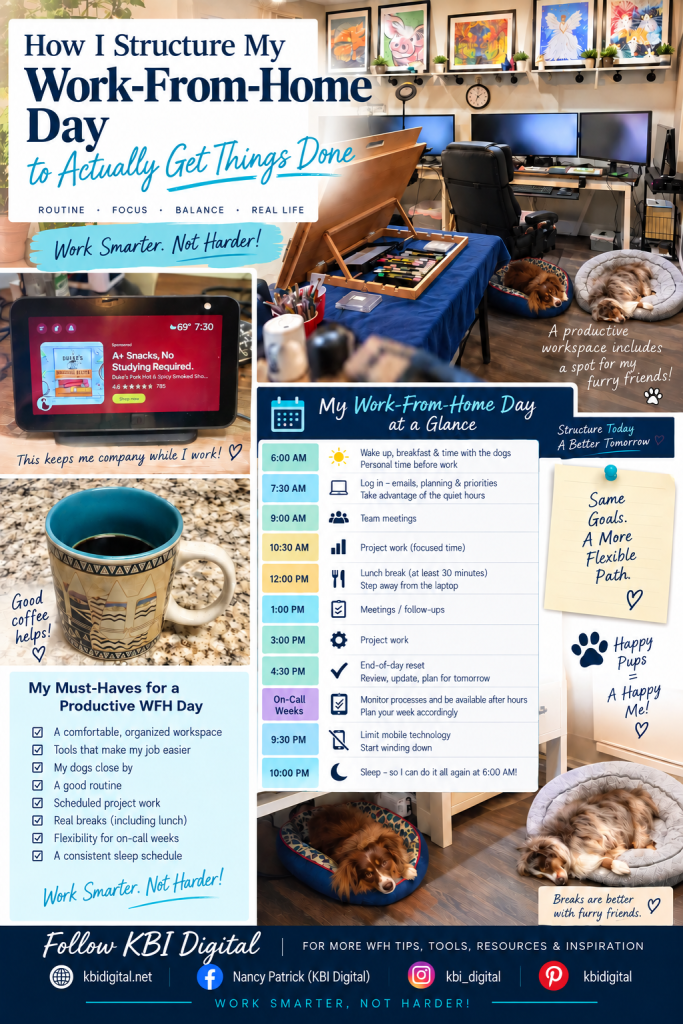
When you put it all together, my routine looks something like this:
6:00 AM — Wake up.
Breakfast, time with the dogs, get ready, and have some personal time before work.
7:30–8:00 AM — Log in.
Use the quieter early hours for emails, planning, priorities, and getting things started.
Morning — Meetings + focused work.
Work around meetings and protect blocks of time for projects.
Lunch — At least 30 minutes away from the laptop.
Eat, step away, and take a real break.
Afternoon — Projects, meetings, follow-ups, and focused work.
Keep moving the day’s priorities forward while leaving room for the unexpected.
End of the workday — Reset.
Review what’s finished, identify what still needs attention, and prepare for tomorrow.
On-call weeks — Adjust.
Plan for the possibility of monitoring processes or working outside normal hours.
Around 9:30 PM — Start putting the technology away.
Limit mobile technology and start winding down.
Around 10:00 PM — Sleep.
Get the rest I need so I’m ready to start again at 6:00 AM.
The Goal Isn’t a Perfect Schedule
Some days are organized and productive.
Other days are controlled chaos.
That’s normal.
The point of having a routine isn’t to make every day identical.
My schedule changes. Meetings change. Projects change. Priorities change. On-call weeks are different from regular weeks. Unexpected things happen.
The routine simply gives me a framework to come back to.
For me, working productively from home means knowing when I want to start my day, taking advantage of quiet time, protecting project time, taking real breaks, planning around additional responsibilities, preparing for tomorrow, and getting enough sleep to do it all again.
It’s not about squeezing productivity out of every available minute.
It’s about creating a workday—and a life around that workday—that is sustainable.
That’s what working smarter from home really means.
Want More Work-From-Home Tips?
I share practical ideas for working smarter, staying productive, creating a better home office, and making remote work actually work in real life here at KBI Digital.
And if you’re ready to take your work-from-home routine even further, my Work Smarter From Home book goes deeper into building better habits, organizing your workday, creating an effective workspace, managing your time, and developing a remote-work routine that works in the real world.
Work Smarter. Not Harder.


Leave a Reply